
Dental practice management software
Everything in one place.
An interactive dental chart and treatment plans, X-ray and scanner sync, AI-powered clinical notes, scheduling, forms, payments and CRM — on one cloud platform. Hundreds of dental clinics have already switched.
Meets Ministry of Health requirements and approved by the Israel Tax Authority · X-ray and scanner sync · AI clinical notes
The standard for dental practice management in Israel
From the chair to follow-up
— all in one system.
See Medform in action across the entire patient journey at a dental clinic: clinical notes and the dental chart, scheduling, CRM leads and payment — unified and automated.
Interactive tooth chart and AI-powered clinical notes
Every patient gets a full odontogram with per-tooth treatment history and multi-phase treatment plans. Don't feel like typing? Tap the microphone and Jett Scribe turns your dictation into structured clinical notes in seconds — straight into the file.
- Odontogram and tooth chart with per-tooth history
- Multi-phase treatment plans with prices and status
- Voice dictation for instant clinical notes
Online booking and reminders that prevent no-shows
A dedicated booking page for your dental practice — availability by dentist, room and service, with no double bookings. Patients book themselves 24/7, the calendar updates instantly, and a WhatsApp reminder goes out automatically to keep gaps out of the schedule.
- Online self-booking 24/7
- Google and Outlook sync and waitlist
- Automatic WhatsApp reminders against no-shows
Built-in CRM and an AI assistant that closes leads on WhatsApp
Jett answers prospects on WhatsApp around the clock, books appointments and saves every inquiry to the CRM. Leads from Google, your website and your ads come in automatically with status and follow-up — so no potential patient gets lost.
- Jett answers on WhatsApp 24/7 and books appointments
- Leads from Google, your website and ads straight into the CRM
- Every inquiry saved and managed until the actual appointment
Invoices, card payments and automatic patient retention
Digitally signed invoices and receipts per Israel Tax Authority requirements, plus one-click card payments. After payment the system sends an automatic recall for a check-up or continued treatment — generating recurring revenue effortlessly.
- Tax Authority-approved invoices + card payments
- Automatic recall and follow-up reminders
- Patient retention and recurring revenue — on autopilot
X-rays and imaging saved automatically to the cloud file
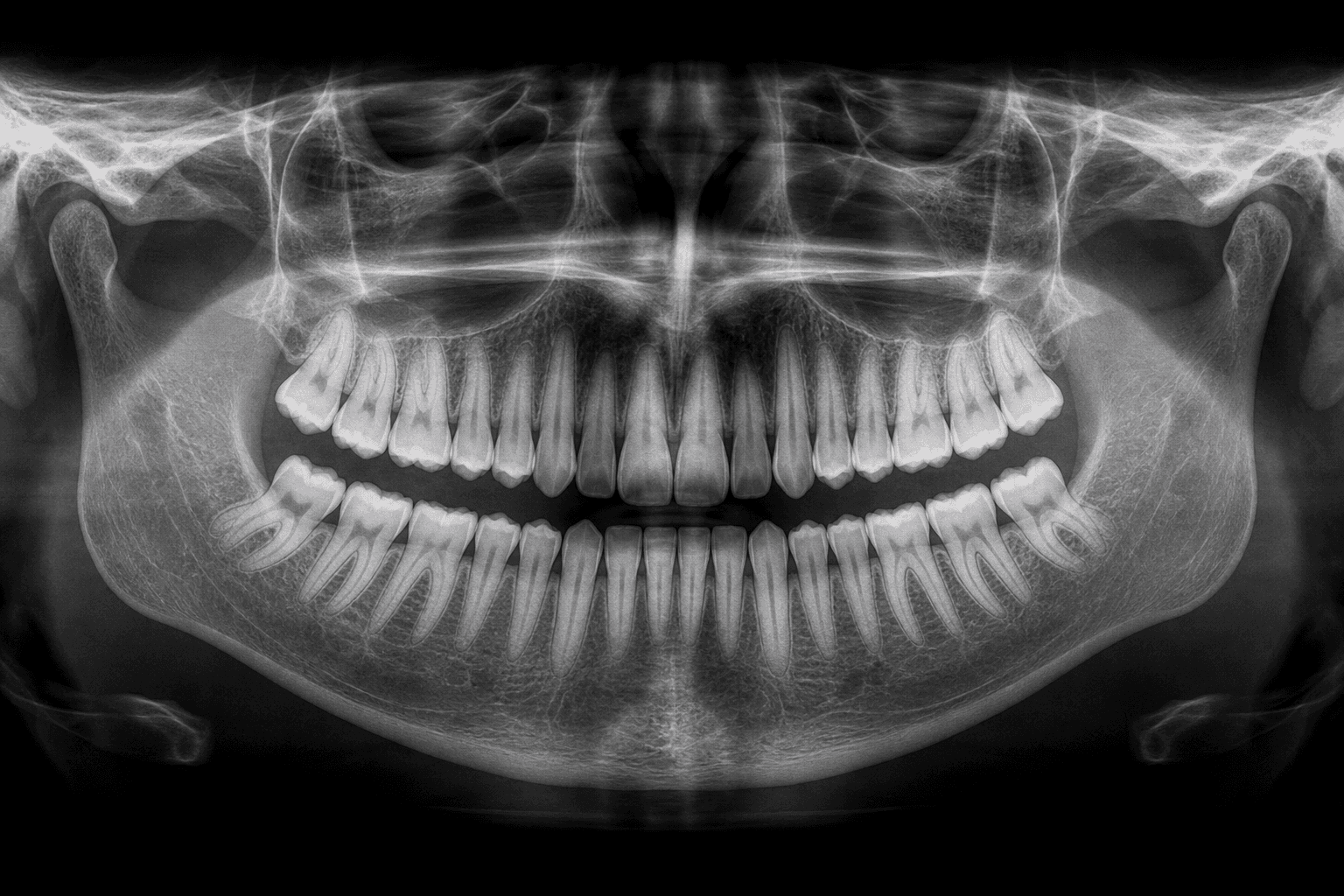
X-ray and imaging scanners connect directly to Medform — every panoramic, bitewing or CT scan is saved automatically to the patient's cloud file the moment it's taken, with no manual uploads and no files lost on a local PC. And because everything lives in the cloud, you can view images from anywhere, on any device — the treatment room, home or mobile — always alongside the tooth chart, treatment plan and medical history.
- Direct connection to X-ray scanners and imaging devices
- Every image saved automatically to the patient's cloud file
- View images anywhere, on any device, next to the file and treatment plan
Digital perio chart for gum measurements and periodontal follow-up
A full perio chart (gum map) right in the patient file: pocket depth (PD), gingival margin (GM), clinical attachment loss (CAL), bleeding on probing (BOP), plaque, mobility and furcation — for every tooth and every site. Values are plotted automatically on the gum graph next to the tooth chart and X-rays, making it easy to spot periodontal disease and track improvement between visits.
- Pocket depth, margin and attachment loss (PD/GM/CAL) per tooth
- Bleeding, plaque, mobility and furcation with automatic statistics
- Compare exams to track gum health over time

A dental clinic gets spread across lots of separate systems.
Medform brings it all into one.
Dental software should bring all of your work into one place. Here's the difference between a workday scattered across separate tools and a clinic where the entire clinical and business workflow runs in one system.
Without Medform
- X-rays and scans live in separate software, on another computer in the room
- Clinical notes are written by hand after every patient — hours at the end of the day
- Reminders and confirmations go out manually, and patients don't show up
- Receipts, collections and payment tracking live in a separate Excel file
- Lab work is logged in a notebook — nobody knows what's back and what's still at the lab
- Imaging referrals are handwritten, never saved to the record and never reach the patient
- Leads from the website and ads fall through the cracks
With Medform
- All imaging syncs to the record automatically — right next to the dental chart
- AI documents and summarizes the treatment in seconds, typed or by voice
- Reminders, confirmations and recalls go out automatically on WhatsApp
- Signed invoices and receipts, collections and reports — Israel Tax Authority approved
- Every lab case on a Kanban board — and the patient is notified when it's back
- A structured imaging referral, signed and sent to the patient from the record
- A built-in CRM captures every lead and turns it into a booked appointment
Dental chart, treatment plan, perio chart, imaging referrals and lab work — in one record
Medform's dental module was built with dentists in Israel. Everything that happens around the chair — from the first finding on the chart, through the estimate the patient receives on WhatsApp, to the imaging referral and the case that came back from the lab — is documented in one system. No notebooks, no spreadsheets and no handwritten letters.
The treatment plan is built on the chart —
and the patient gets it on WhatsApp
Mark a tooth and surface — M/L/D/B/I/O — on the dental chart (FDI; permanent, primary or mixed dentition) and pick a treatment from the clinic's price list. Each treatment gets its own color-coded status, price, treating dentist and per-tooth history. Generate an estimate from the treatment plan in one click: a plan-level discount, a split between the patient and a third-party payer, with or without VAT — then send a PDF with the chart image to the patient via WhatsApp, email or SMS. When the patient accepts, the status in the record changes to "Approved" and the plan moves to treatment.
- FDI dental chart for permanent, primary and mixed dentition, with surface marking
- Treatment plan vs. estimate, and up to 3 plans compared side by side
- Payment splits between the patient, insurance and an external payer
- A PDF with the chart, prices and status — sent to the patient via WhatsApp, email or SMS
- A treatment sheet for every visit: teeth, surfaces, ICD-9 codes and the dentist's signature
Ronit Cohen · Dental chart
Record 10428 · Active treatment plan
Tooth 26 — superficial distal caries, composite filling recommended
A structured imaging referral — panoramic, bitewing or CBCT —
sent to the patient in one click
Instead of a free-text letter, the imaging referral is built from the record: choose the X-ray type (panoramic, bitewing, periapical, intraoral scan), orthodontic X-rays, or CT/CBCT with slice thickness, mark the teeth on a small chart and state the clinical indication — implant planning, root canal, surgery. The referral is generated as a PDF with the dentist's signature, sent to the patient via WhatsApp, email or SMS, and saved to the record. And when the X-ray is taken at the clinic, Medform's CloudBridge triggers the X-ray device from the record and files the image to the patient — so you can view it from any device.
- Dental X-ray types, orthodontic X-rays and CBCT with slice thickness
- Tooth selection on a chart and a clinical indication (implant, root canal, surgery)
- A signed PDF, sent to the patient and saved to the record
- CloudBridge: trigger the X-ray device from the record and file the image automatically
Lab cases on a Kanban board —
know what's at the lab, what's back and what's waiting for the patient
Every crown, bridge, denture or veneer sent to the lab opens as a lab case linked to the patient and the teeth: lab, technician, shade, pickup and delivery dates, files and notes. The board shows all of the clinic's cases by status — New, Sent to lab, Back from lab, Closed — with filters for dates and payment. When the case is back, the patient is notified and the team books the cementation appointment, without chasing anyone.
- A Kanban board and table for all of the clinic's lab cases
- Linked to teeth, shade, technician, and pickup and delivery dates
- A printable, sendable lab order form, with paid / unpaid filters
- A patient notification when the case is back from the lab
More clinical tools dentists look for in dental practice management software
Not features on paper — every one of these tools is in use today at dental clinics across Israel, inside the same patient record.
Perio chart (periodontal charting)
Pocket depth (PD), gingival margin (GM), calculated attachment loss (CAL), bleeding (BOP), plaque, suppuration, mobility and furcation — for every tooth and every site. Automatic statistics, copying the previous exam, exam-to-exam comparison with improvement/worsening markers, and a PDF for the record.
A clinical treatment sheet for every visit
Structured documentation of the visit: teeth and surfaces, treatments performed, ICD-9 codes, findings, an AI summary and the dentist's signature — ready to print, send and save to the record.
Dental consent forms
Ready-made health questionnaires and consent forms for implants, surgery, root canals, orthodontics and sedation — sent to the patient's phone, signed remotely and filed before they arrive.
Plan comparison and estimates
Up to three treatment plans side by side — implant vs. bridge, for example — with totals, discounts and balances, so the patient can choose a path and the clinic can close the plan.
Patient files, photos and X-ray viewing
File folders by type, direct capture from the camera, before/after photo comparison, and X-ray and TIFF viewing with zoom, rotation, brightness and contrast — from any device.
Treatment-based recall and patient retention
Each service has its own recall interval (scaling, checkup, continued treatment). The system surfaces who's due, sends a message with a booking link and tracks retention on the dashboard.
AI that works inside the dental clinic — in the record, the calendar and WhatsApp
Jett isn't an external add-on. It lives inside the patient record, the calendar and the clinic's WhatsApp, and works on your data — summarizing treatments, drafting documents, answering patients and returning hard numbers about the business.
A clinical summary in seconds
Speak or type — and Jett drafts a structured treatment summary in the record. It learns how each dentist at the clinic writes and adapts to their style, so the notes sound like you wrote them.
Letters, referrals and documents
Write a short instruction — "Referral to a periodontist for 26 with 6 mm pockets" — and Jett drafts the document from the record. You review, approve and send it to the patient.
Ask a question, get a report
"How much revenue did crowns bring in last quarter?", "Which patients have an open treatment plan and haven't come in for six months?" — Jett queries your clinic's data and answers with the numbers.
24/7 replies on WhatsApp
Answers patients and prospects on the clinic's WhatsApp, offers appointments based on real calendar availability, books them, sends forms and opens a lead in the CRM. Medical questions and urgent cases are routed to the team.
- “How much revenue did crowns bring in last quarter?”
- “Which treatment plans over ₪5,000 are still open?”
- “How many appointments were canceled this month, and where did the leads come from?”
- “Which patients haven't had a checkup in over a year?”
Answers come from your clinic's data only — revenue, treatments, appointments, patients and leads — and are shown with the numbers, not estimates.
More about Jett, the clinic's AI assistantDental practice reports — financial, clinical and operational, exportable to Excel and PDF
Every report a dental practice manager and their accountant need, on live clinic data — no exporting to Excel and building tables by hand at the end of the month.
Finance and accounting
- Revenue report by period, dentist and payment method
- Profit and loss and expenses with allocation numbers
- Receivables and collections — open balances and late payments
- VAT and income tax advances
- Check and cash deposits
- Export to Hashavshevet and your accountant
Clinical and treatment plans
- Treatment plan dashboard — proposed, approved, completed
- Treatments report by service, dentist and period
- Treatment summaries for the dentist and the patient
- Payers report — insurers and third-party payers
- Full patient record export
- Perio chart and treatment plan to PDF
Operations, staff and marketing
- Dentist compensation by period and percentage
- Staff attendance and shifts
- Printable dentist schedule and calendar utilization
- Referrals and leads by source
- CRM performance and lead tracking
- Real-time control center — clinical, operational, financial
Everything included in the dental module
The dental module doesn't stand alone. It's connected to the calendar, payments, forms, prescriptions, messaging, the CRM and the clinic website — so your team doesn't have to maintain manual workflows around the system.
Israeli dentists on Medform
Dental clinics, prosthodontists and implant centers already working in the cloud — no paperwork, no local server and no switching between systems.

I've been using Medform to run my clinic for a few months now, and I can say it loud and clear: finally, software that truly thinks about us dentists. The system is convenient and intuitive and includes everything you need — from calendar management to smart patient communication (WhatsApp, email and Google). There are features I haven't seen in any other system: retention automations, document sending, prescriptions and reminders. Most importantly — real 24/7 support that helps immediately and listens to feedback. If you're looking for a smart, accessible management solution, I warmly recommend it.
 Dr. GafaliSmileplace · Dental clinic
I want to share my experience and warmly recommend Medform for managing dental clinics. Using the software has made running the clinic smoother and simpler than ever — precise appointment management, detailed patient files, easy accounting, comprehensive reports and efficient staff scheduling. The interface is convenient and inviting, saves time and boosts efficiency. I warmly recommend it to every dentist — it's an upgrade you won't regret!
 Dr. Amit PimaAdvanced dental clinic
A warm recommendation for the Medform system. Since we started working with the cloud dental practice software, we can say with confidence that it was an excellent choice. The system is convenient, smart and efficient — and the team's service is simply outstanding. We warmly recommend it to any clinic that wants to become more efficient and work smarter!
 Dr. David AttiaDental Implant Center
Medform is a rare piece of software! I had countless problems with my previous software in every respect. I turned to Medform and got more than I expected — the whole data migration and the way information is organized inside the software are truly efficient. The best service I've ever known, support at the click of a button, and there's always a rep who solves every issue. The software runs smoothly, my relationship with my patients has grown stronger and follow-up is clearer than ever. I recommend everyone at least check it out.
 Dr. Yitzhak RegevDental clinic
There is no other dental practice software like this. I've been in medicine for 30 years and they still managed to show me something new — I have to say I was very surprised.
 Dr. Dan HershkovitzDental clinic
As an independent clinic, I often found myself dealing with overload, coordination, cancellations and schedule changes that caused frustration and wasted precious time. Since I started using Medform, I feel a real change — the system helped me get organized, manage the schedule efficiently, track treatments and keep continuous communication with patients, all in one place. I warmly recommend it to anyone who runs a clinic and wants to save time, reduce stress and feel in control.
 Dr. Karina PovarchikDental clinic
Runs smoothly and the service is great. On top of that, the system has significantly grown our patient base, saving us irrelevant advertising expenses. Warmly recommended.
Really good, easy to use cloud based software — I wished I could've used it years ago. Saves a lot of time and stress!
 Dr. Alan HirschowitzDental Care · Personal dentistry
Excellent software, very up-to-date and innovative, with integrated AI that saves a ton! Very easy to use, excellent display, excellent service and support. Highly recommended to every dentist!
 Dr. Haim AvshalomProsthodontics specialist
An easy, user-friendly system. The best service by far of any company.
 Dr. Iddo LevyPersonal dental clinic
How much does Medform's dental practice management software cost?
No multi-year contracts that lock your clinic in, and no paying separately for perio charting, lab work or digital forms. One transparent monthly plan that includes the entire dental module.
The full dental module and platform
Dental chart, perio chart, treatment plans, lab Kanban, imaging referrals, scheduling, CRM and accounting — in one plan.
First month free · No long-term commitment
One-time setup fee — ₪1,200
2 users · 100GB cloud storage included
Add users and storage at any time as your clinic grows
What's included for ₪390/month for a dental clinic:
- Interactive dental chart (FDI — permanent, primary and mixed dentition) with per-tooth history
- Full perio chart (PD, GM, CAL, BOP, mobility and furcation) with exam comparison
- Treatment plans, up to 3 alternatives compared, and estimates via WhatsApp / email
- Payer splits and dental insurance (Harel, Phoenix, Migdal, Menora, Clal and more)
- Structured X-ray and CBCT referrals + CloudBridge imaging sync
- Kanban board for lab work (crowns, bridges, dentures, shade and delivery dates)
- 24/7 online booking, lead CRM, forms and digital signatures
- Israel Tax Authority–approved invoices and receipts, payments and P&L reports
* Advanced AI capabilities (the Jett assistant) and the WhatsApp Business API are available as add-ons. SMS is purchased in credits, and payment processor fees are paid directly to the processor.
All your imaging connects directly to the patient record
At many dental clinics, visual data lives in separate imaging software or on a computer in one room. Medform connects imaging directly to the patient record — X-rays, panoramic/CBCT, intraoral scans and documents — so the entire visual history sits next to the odontogram and the treatment plan.
Planmeca & Romexis®
Full connection to the Planmeca ecosystem, including a direct integration with Romexis software for managing imaging, panoramic/CBCT X-rays and scanners — right from the patient record.
- Planmeca Romexis® Software
- Planmeca ProMax (CBCT / X-Ray)
- Planmeca Emerald / Emerald S
Align Technology (iTero)
Instant sync of scans to the patient record and precise tracking of treatment progress, including integration with clear aligner treatment (Invisalign).
- iTero Lumina
- iTero Element 5D / 5D Plus
- iTero Element 2 / Flex
Dentsply Sirona & Sidexis
A direct connection to advanced scanning systems and Sidexis imaging software, preserving X-ray and scan history and supporting in-clinic CAD/CAM workflows.
- Sidexis 4 / Sidexis XG
- Primescan / Primescan Connect
- Orthophos / Omnicam
DEXIS / Carestream Dental
Broad support for the imaging software and scanners of the Envista group (formerly Carestream Dental), for fast retrieval of X-rays and scans.
- CS Imaging Software
- DTX Studio Clinic
- DEXIS IS 3800W / 3700 / 3600
3Shape
TRIOS scanners deliver a fast, comfortable scanning experience. The Medform connection enables seamless data transfer for managing visual records in the cloud.
- 3Shape Unite
- TRIOS 5 Wireless
- TRIOS 4 / TRIOS 3 / Core
Medit
Seamless integration with the Medit Link app, enabling fast import of high-quality color scans directly into the patient's odontogram.
- Medit Link Software
- Medit i900
- Medit i700 / i700 Wireless / i600
Medform is built on an open architecture and also supports Vatech (EzDent-i / Ez3D-i) · Schick (Sirona) · Exocad (DentalCAD) · Shining 3D (Aoralscan series) · Straumann Virtuo Vivo · Launca / Panda / Neoss and more. Your scanner or X-ray device isn't on the list? Our development team can build a custom integration for almost any scanner, X-ray device or imaging software — within days.
Talk to us about connecting your clinicFull data import within hours.
Our team does it all for you.
Dozens of clinics switch to Medform every month — from every other system. Our team handles the data import, setup and training. And if you ever want it, a full data export is available anytime — no lock-in.
Talk to our teamHow the switch works
- 1Our team exports your data from the old system
- 2We import patients, appointments and medical history — everything
- 3We train your team in a single call
- 4You start working — with no disruption to daily operations
No downtime — switch without closing your clinic for even a day.
What to know before switching to Medform
Short answers to the questions dentists and practice managers ask most often before choosing dental software to run their clinic.
- The module includes a full dental EMR — odontogram and dental chart, multi-phase treatment plans, per-tooth treatment history, X-ray and scanner sync, digital forms, prescriptions, payments and accounting, CRM, reminders and patient communication automations — all on one cloud platform.
Didn't find an answer? Ask our AI
Answers instantly · Based on Medform's knowledge
Hi 👋 I'm Medform's smart assistant. Ask me anything about the system — pricing, features, security, migrating from a previous system — and I'll be happy to help.
Answers are generated automatically and may contain inaccuracies. For a personal answer — book a demo.
More information to help you choose dental clinic software
It's time your clinic worked for you — not the other way around.
Hundreds of clinics already save dozens of hours a week with Medform. First month free, set up in minutes — cancel anytime.
Set up in minutes · 24/7 support, including AI agents